# 🚀 Quick Start Guide
**Step 1: Choose Your Scanner**
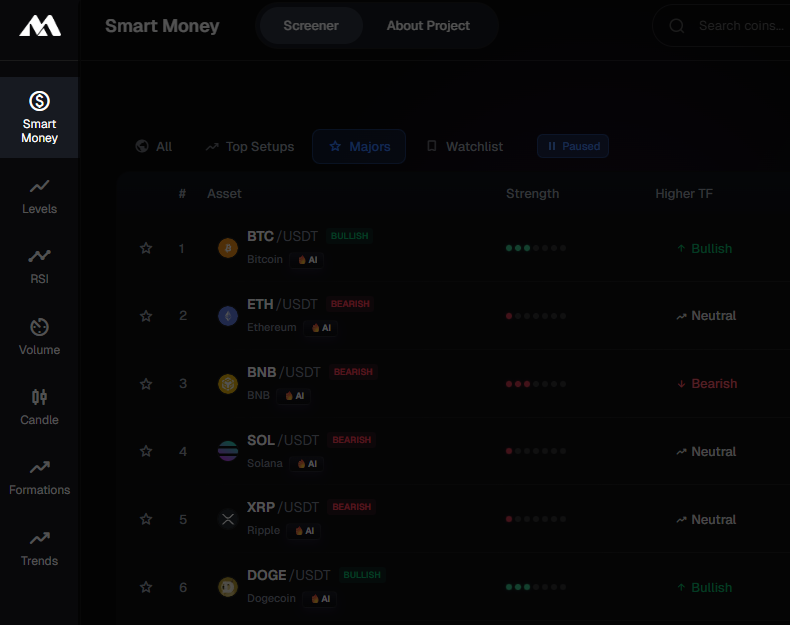 Market Scan has 7 specialized scanners. Pick the one that matches your trading style:
**For Advanced Traders:**
* 💎 [**Smart Money**](https://alpinee.io/smart-money) - Order blocks, FVG, BOS, liquidity sweeps, market structure
**For Scalpers:**
* 📊 [**Levels**](https://alpinee.io/market-scan) - Real-time support/resistance touches and breakouts
**For Technical Traders:**
* 📈 [**RSI**](https://alpinee.io/rsi) - Convergence, divergence, overbought/oversold
* 💰 [**Volume**](https://alpinee.io/volume-spikes) - Aggressive buying/selling spikes
**For Pattern Traders:**
* 🕯️ [**Candle**](https://alpinee.io/candle-scanner) - Classic candlestick reversal patterns
* 📐 [**Formations**](https://alpinee.io/formations) - Double tops/bottoms, flags, wedges
**For Trend Followers:**
* 📈 [**Trends**](https://alpinee.io/trends) - Trend direction and momentum analysis
Not sure? Start with [**Levels**](https://alpinee.io/market-scan) - it's the most beginner-friendly.
**Step 2: Read the Results**
Market Scan has 7 specialized scanners. Pick the one that matches your trading style:
**For Advanced Traders:**
* 💎 [**Smart Money**](https://alpinee.io/smart-money) - Order blocks, FVG, BOS, liquidity sweeps, market structure
**For Scalpers:**
* 📊 [**Levels**](https://alpinee.io/market-scan) - Real-time support/resistance touches and breakouts
**For Technical Traders:**
* 📈 [**RSI**](https://alpinee.io/rsi) - Convergence, divergence, overbought/oversold
* 💰 [**Volume**](https://alpinee.io/volume-spikes) - Aggressive buying/selling spikes
**For Pattern Traders:**
* 🕯️ [**Candle**](https://alpinee.io/candle-scanner) - Classic candlestick reversal patterns
* 📐 [**Formations**](https://alpinee.io/formations) - Double tops/bottoms, flags, wedges
**For Trend Followers:**
* 📈 [**Trends**](https://alpinee.io/trends) - Trend direction and momentum analysis
Not sure? Start with [**Levels**](https://alpinee.io/market-scan) - it's the most beginner-friendly.
**Step 2: Read the Results**
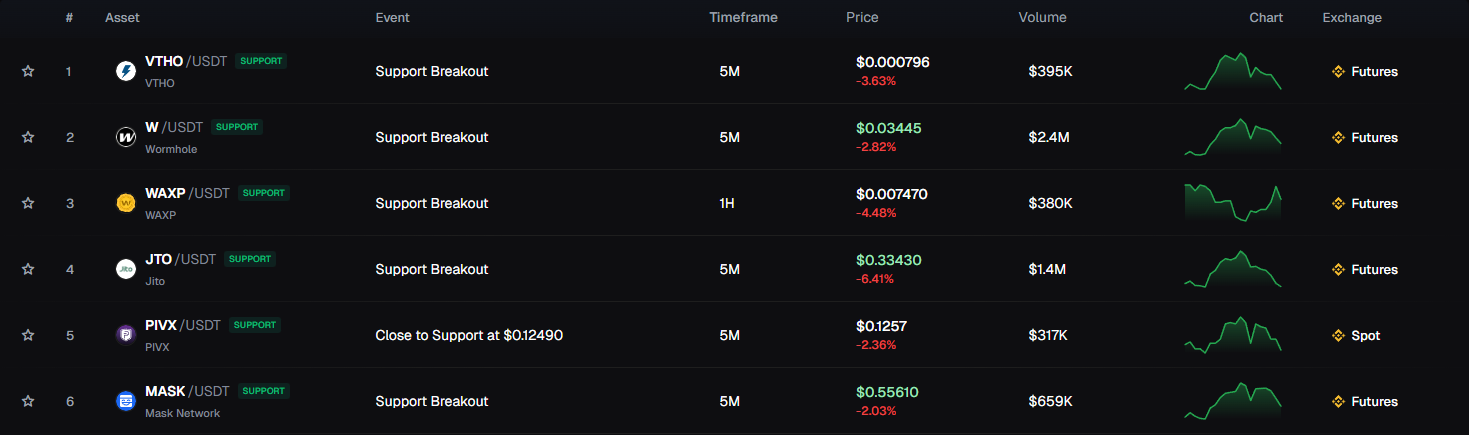 Each scanner shows a **table** with active setups:
**Table:**
| Column | What it shows |
| ------------- | ------------------------------------------- |
| **Asset** | Trading pair name |
| **Event** | What happened (e.g., "Close to Resistance") |
| **Timeframe** | 5M, 15M, 1H, 4H, 1D |
| **Price** | Current price + % change |
| **Volume** | Trading activity |
| **Chart** | Mini price chart |
**Click any row** to see detailed information in the sidebar.
Each scanner shows a **table** with active setups:
**Table:**
| Column | What it shows |
| ------------- | ------------------------------------------- |
| **Asset** | Trading pair name |
| **Event** | What happened (e.g., "Close to Resistance") |
| **Timeframe** | 5M, 15M, 1H, 4H, 1D |
| **Price** | Current price + % change |
| **Volume** | Trading activity |
| **Chart** | Mini price chart |
**Click any row** to see detailed information in the sidebar.